.png&w=1920&q=75)

Can You Use Softr to Build Internal Tools for Your Team?
Yes, and honestly, internal tools are where Softr quietly shines.
Most people meet Softr through client portals or public directories, so they miss that the same engine is excellent for the apps your own team uses behind the scenes. The stuff that never faces a customer: the dashboard your ops lead checks every morning, the form your field team fills out, the admin panel where someone updates records without touching a raw database.
We build these constantly, and they are often the highest-value, lowest-drama projects a business can do. Here is what internal tools actually are, what people build, and where Softr fits and where it does not.
Short answer: yes, and it is one of the best things Softr does
An internal tool is any app your team uses to get work done, as opposed to something your customers use. Softr builds these on top of your existing data, with logins and permissions, so different people see and do different things. That is the exact shape most internal tools need, which is why Softr handles them so well.
What counts as an internal tool
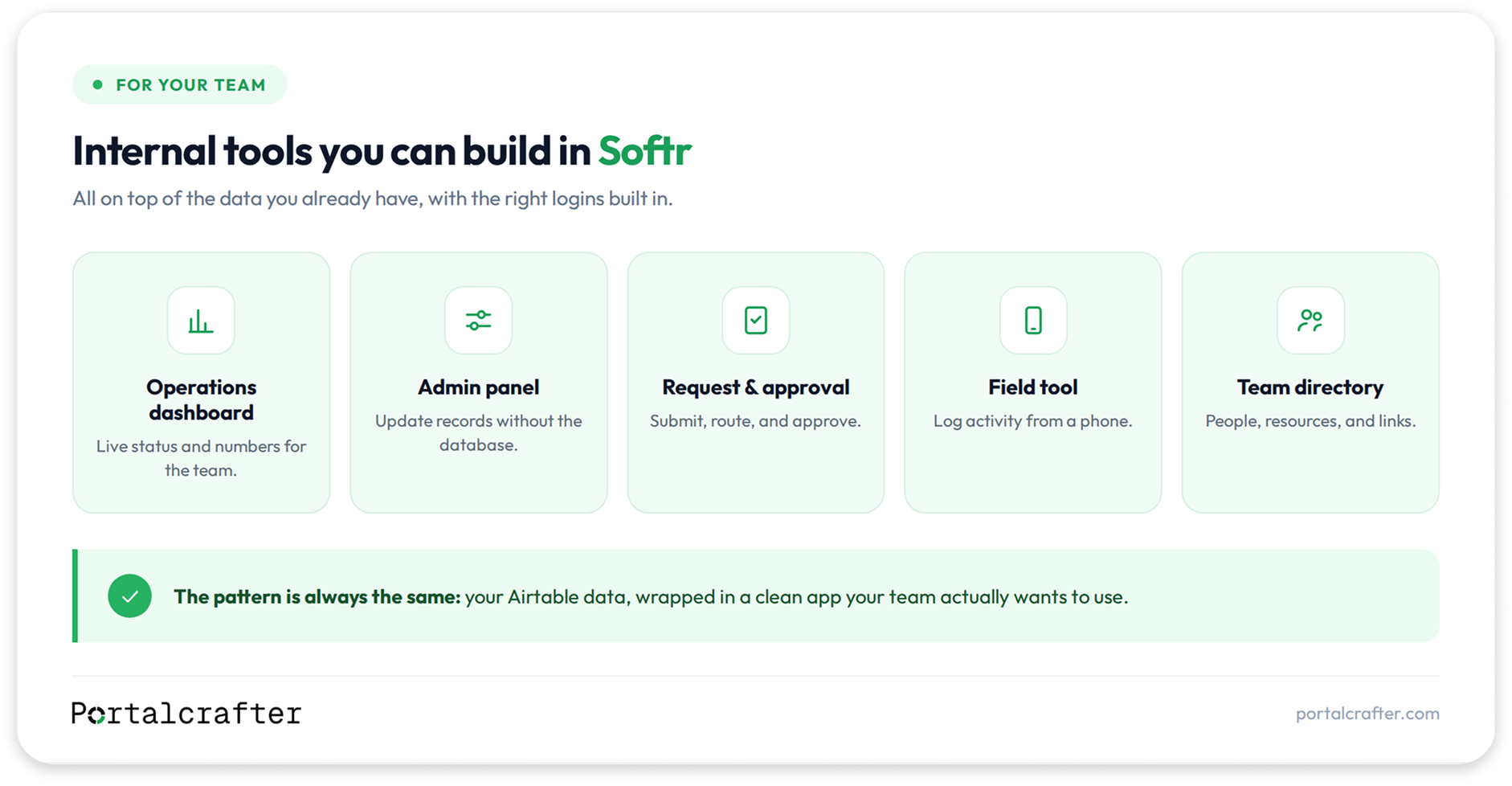
If you have ever thought “we need a simple app for the team to do X,” that is an internal tool. Common examples:
• A dashboard that shows the team the numbers or the pipeline.
• An admin panel where staff view and update records without going into the database.
• A data-entry app, a form-based tool for logging things cleanly.
• A request or approval system, someone submits, someone else approves.
• A team directory, a resource hub, an internal knowledge base.
None of these face a customer. They exist to make your team faster and your data cleaner.
What teams actually build in Softr
To make it concrete, here are internal tools we see built on Softr again and again:
• Operations dashboards that pull live from Airtable so the team sees status, workload, and numbers without asking anyone.
• Client and project management panels where account managers see only their accounts and update status in a clean interface.
• Request and approval flows, time off, purchases, content sign-off, where a submission routes to the right approver.
• Field and floor tools, simple apps warehouse or on-site staff use on a phone to log activity, so the data stays current.
• Team directories and internal hubs, one place for people, resources, and links, with the right access controls.
Every one of these sits on top of data you already have and replaces a messy spreadsheet or a “just ask Sarah” process.
Why Softr fits internal tools so well
A few reasons internal tools are such a natural fit.
your data is probably already in Airtable, a spreadsheet, or another system, and Softr builds directly on top of it (or on its own built-in Softr DB for fresh builds), so you are not migrating anything. The tool becomes a friendly face on data you already trust.
Logins and permissions come built in, which is exactly what internal tools need. Different roles should see different things, and staff should not be rummaging around in the raw database. Softr handles that without custom work.
It is fast and you can maintain it yourself. Internal tools change as your process changes, and with Softr you can adjust the app without a developer for every tweak. That matters more for internal tools than almost anything else, because they evolve constantly.
And it looks like an app, not a database, which is the difference between a tool your team adopts and one they avoid. Adoption is the whole point of an internal tool.
Where the limits are
Being straight about the ceiling, because it matters for internal tools too.
Softr works through building blocks, so very unusual custom interactions or deep bespoke logic can hit a wall. If your internal tool needs heavy, one-of-a-kind computation or workflows far outside standard patterns, you will feel the edges. Extremely large datasets and very heavy real-time needs also warrant a careful look at how the app is structured.
For the vast majority of internal tools, dashboards, admin panels, request flows, directories, none of this is a problem. But if your tool is really a complex custom application in disguise, that is worth knowing up front.
Softr vs a heavier internal-tool platform
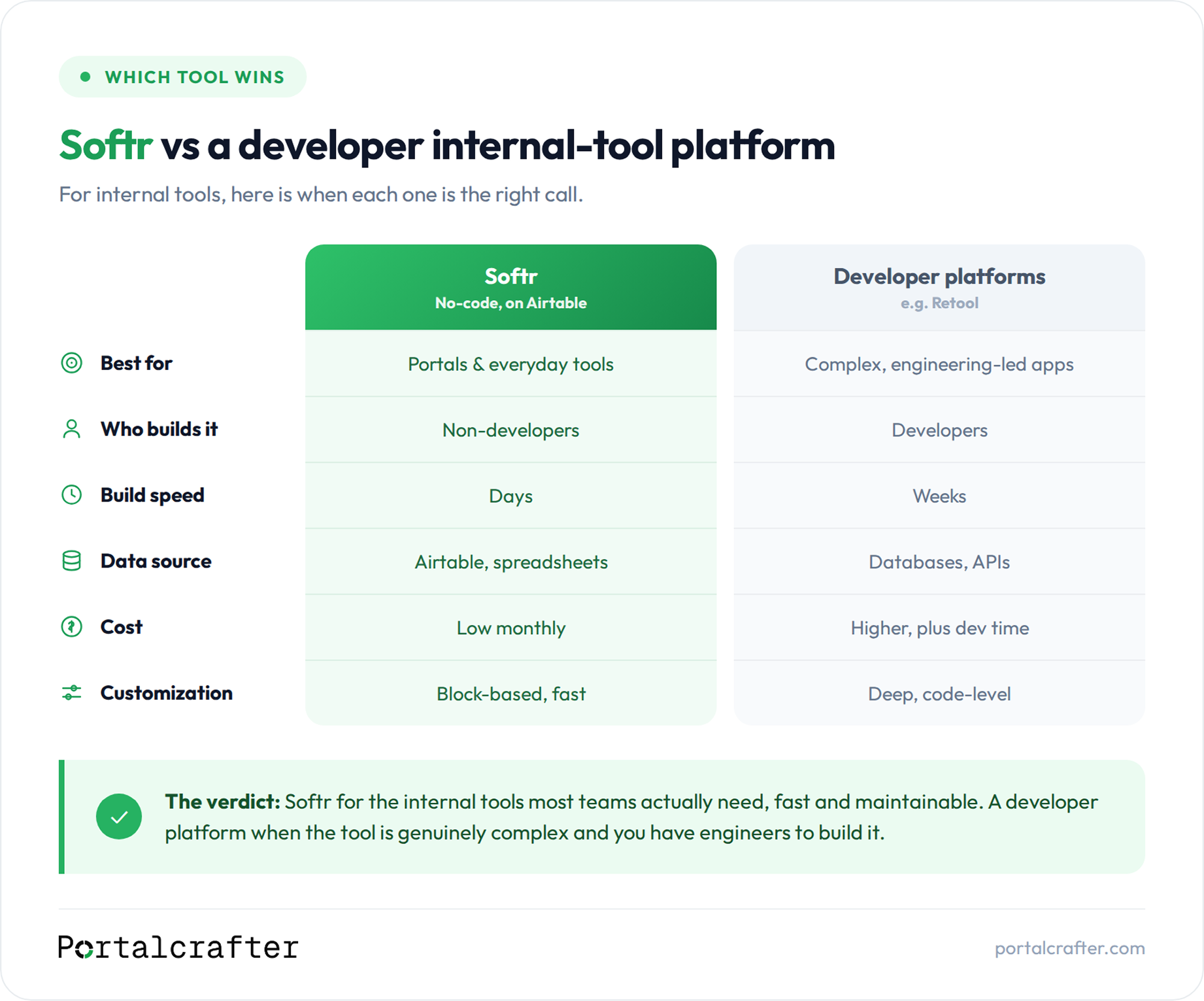
You may have heard of engineering-focused internal-tool builders like Retool. Here is the honest distinction.
Those platforms are powerful and built for developers to assemble complex internal apps with lots of custom logic and connections. They are excellent when your internal tool is genuinely complex and you have technical people to build it.
Softr sits in a different, and for most businesses more useful, spot: it is for internal tools that sit on top of your Airtable data, that you want live quickly, and that non-developers can build and maintain. For the everyday internal tools most teams need, Softr is simpler, faster, and cheaper. For heavy, engineering-led internal platforms, a developer-focused tool may fit better.
Match the tool to the complexity. Most internal tools are simpler than people assume.
Build it yourself or hire
If your internal tool is straightforward and your data is already in Airtable, you can build a solid version yourself. That is part of Softr’s appeal.
If it is more involved, multiple roles, several connected data sources, automations tying it to the rest of your stack, or you want it designed well from the start, that is where help pays off. The structure and permission model are the parts worth getting right the first time, since a tool your whole team relies on is painful to rebuild.
Frequently asked questions
Can Softr internal tools connect to our other software? Yes. Softr builds on Airtable, and through automations and integration platforms your tool can connect out to your CRM, messaging, and other systems, so it fits into the stack you already run.
Can I control who sees what? Yes, that is a core Softr feature. You set permissions so each person or team sees only what they should, which is exactly what internal tools require.
Is Softr secure enough for internal company data? Softr provides logins, permissions, and secure access, and your data lives in Airtable with its own controls. As with any tool, most of the security comes from setting the permission model up correctly. For highly regulated data, evaluate the stack against your specific requirements.
Will the team actually use it? That is the real test of any internal tool, and it comes down to whether it feels like a clean app rather than a database. Built well, Softr internal tools get adopted because they are simple and pleasant to use.
The short version
You can definitely use Softr to build internal tools, and it is one of the things it does best. Dashboards, admin panels, request and approval flows, field tools, directories, all on top of data you already have, with logins and permissions built in, fast to build and easy to maintain. The limits only show up if your tool is really a complex custom application, in which case a heavier platform may fit better.
If your team is running on spreadsheets and “just ask around” processes, an internal tool is often the highest-value thing you can build. Book a free 30-minute call and tell us what your team keeps struggling with, and we will scope the tool that fixes it, with fixed pricing up front: https://calendly.com/vaibhavgarg0632/30min

 Softr
Softr